

On this page+
001 · DevSecOps · © 2026
Building a Secure Supply-Chain CI/CD Platform with Tekton, GitOps, and Cosign
A reproducible DevSecOps platform that turns CI/CD into an evidence chain — Tekton, GitOps, Cosign, Kyverno, and negative tests included.
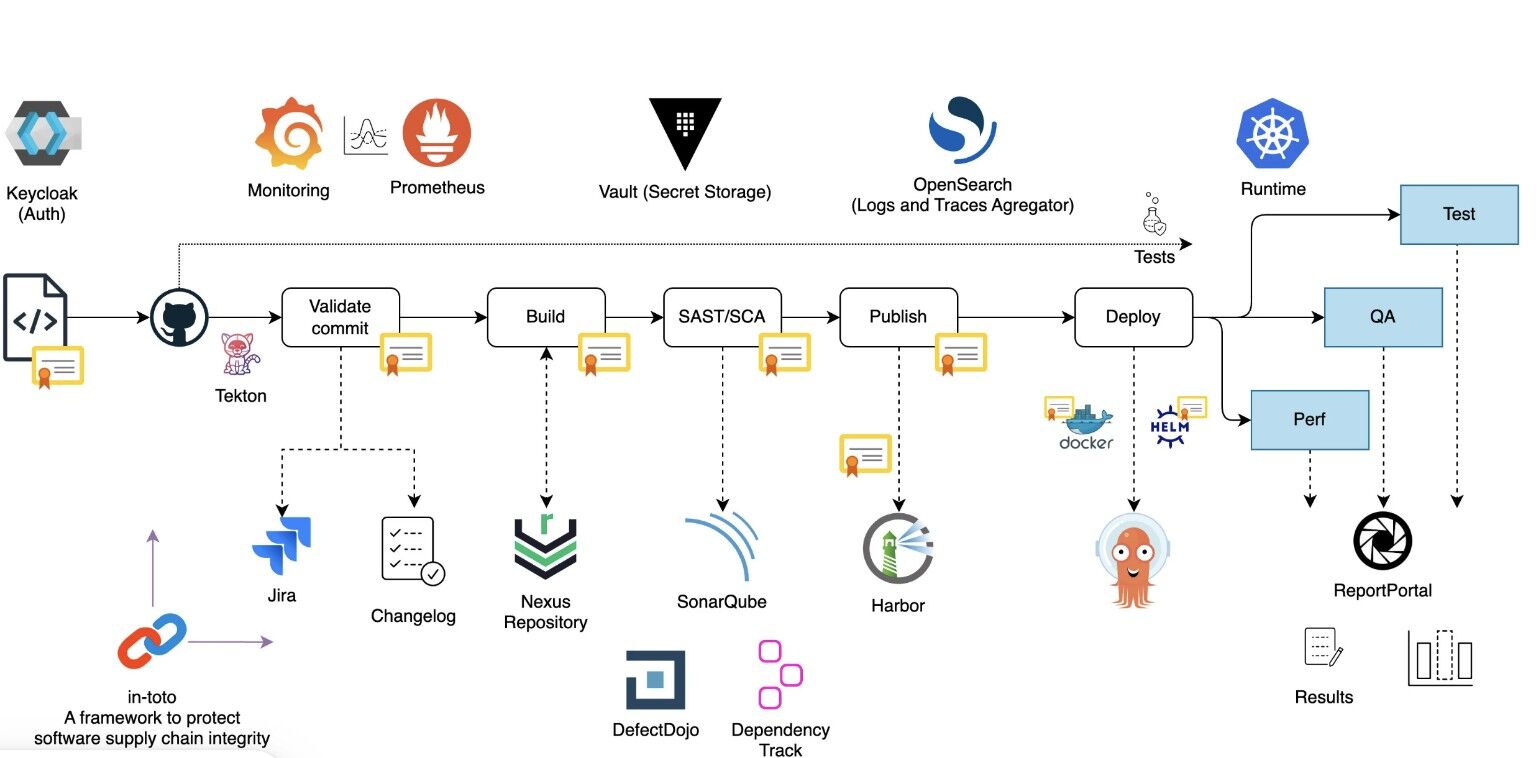
Building a Secure Supply-Chain CI/CD Platform with Tekton, GitOps, and Cosign
Most CI/CD pipelines are designed to answer one question:
Can we build and deploy this application?
While working on my latest project, I wanted to answer a more difficult set of questions:
Can we prove that the source code was checked for secrets?
Can we detect vulnerable dependencies before deployment?
Can we prove that the image tested is the same image deployed?
Can we prevent unsigned or misconfigured workloads from entering the cluster?
Can we promote and roll back releases without manually changing the cluster?
Can another engineer reproduce the entire workflow locally?
The result is Pipeline, a reproducible DevSecOps platform built around Tekton, GitOps, Cosign, Kyverno, Kubernetes, and kind.
The project is available on GitHub.
Project goals
Pipeline was designed around four principles:
Reproducibility — the platform should run locally with a documented workflow.
Enforcement — security controls should block unsafe changes instead of only reporting them.
Separation of concerns — CI should validate artifacts while GitOps controls deployment.
Evidence — every important security and deployment claim should be testable.
The intended workflow is:
make bootstrap
make demo
make negative-tests
make destroy
The first command creates a local Kubernetes environment. The demo builds, scans, signs, and deploys the application. The negative tests then introduce intentionally unsafe examples to prove that the security gates reject them.
This makes the repository more than a collection of configuration files. It becomes a complete, executable example of a secure software delivery process.
Repository structure
The repository is organized into separate layers so that each responsibility is easy to locate.
| Directory | Responsibility |
| --- | --- |
| examples/demo-app | Python application, tests, dependencies, and Dockerfile |
| charts | Helm chart for packaging the application |
| tekton | CI Tasks, Pipelines, supply-chain tasks, and GitHub Triggers |
| security | Kyverno policies, scanning configuration, SBOM documentation, and DAST policy |
| gitops | Kubernetes base manifests and environment overlays |
| platform | Namespaces, RBAC, NetworkPolicies, observability, and version pins |
| scripts | Bootstrap, build, scan, promotion, rollback, security, and test automation |
| tests | Integration checks, smoke tests, negative fixtures, and performance checks |
| docs | Architecture decisions, runbooks, threat model, operations, and evidence |
This structure makes the repository understandable to someone who did not design it. A developer can start with the sample application, a platform engineer can inspect the Kubernetes and GitOps layers, and a security engineer can review the policies and negative tests independently.
The application layer
The project includes a small Python demo application. It is intentionally simple because the main focus is the delivery platform rather than application complexity.
The application includes:
Unit tests with pytest
Dependency files
Ruff configuration
A multi-stage Dockerfile
Non-root container execution
Health and readiness endpoints
Prometheus-compatible metrics
Resource requests and limits
A restricted runtime security context
The application is packaged as a container image and pushed to a local registry during the demo. The Dockerfile creates a dedicated non-root user and uses a minimal runtime image to reduce the final attack surface.
The demo application gives the platform something realistic to validate, scan, deploy, monitor, and deliberately break.
CI with GitHub Actions and Tekton
The project uses two complementary CI layers.
GitHub Actions provides fast repository feedback. It runs:
Python linting
Unit tests
Shell syntax validation
Helm linting
Gitleaks secret scanning
Trivy repository scanning
Rendered Kubernetes configuration checks
GitOps digest-update tests
Negative security fixtures
The current workflow is visible in .github/workflows/ci.yml.
Tekton provides the Kubernetes-native CI pipeline. The secure-ci Pipeline can:
Clone a repository when triggered remotely.
Scan source code with Gitleaks.
Scan dependencies and files with Trivy.
Run the application tests.
Validate Helm and Kubernetes manifests.
Run Checkov against infrastructure configuration.
Generate an SBOM when an image is provided.
Verify an image signature when signature verification is enabled.
Collect pipeline reports.
The repository also includes Tekton Triggers for GitHub push and pull-request events. The trigger validates the webhook secret, extracts the correct revision, and starts a PipelineRun that clones the relevant source revision before scanning it.
This allows the same repository to support both a local demonstration and a more realistic cluster-based CI workflow.
The software supply chain
The most important part of the platform is the artifact trust chain.
The demo follows this sequence:
Build
  ↓
Trivy image scan
  ↓
Syft SBOM generation
  ↓
Cosign signature and attestation
  ↓
Registry push
  ↓
Signature verification
  ↓
GitOps digest update
  ↓
Deployment
Trivy checks the container image for high and critical vulnerabilities. Syft creates SPDX and CycloneDX SBOM files that describe the components inside the image.
Cosign signs the image and attaches the SBOM as an attestation. The image is then referenced by its immutable digest rather than by a floating tag.
For example:
registry.example/demo-app@sha256:...This is more trustworthy than:
registry.example/demo-app:latestA tag can be moved to a different image. A digest identifies the exact image content that was scanned, signed, and deployed.
GitOps deployment and promotion
The deployment layer uses Kustomize overlays.
The repository contains separate environments for:
Development
QA
Performance
Production
Each environment reuses a common base Deployment and applies its own environment-specific configuration. The application image is stored in the overlay’s kustomization.yaml as a digest pin.
The promotion flow uses the same immutable digest:
make demo
make promote ENV=qa
make promote ENV=performance
make promote ENV=production
Promotion does not rebuild the application. It moves the already-tested artifact through the environment chain.
The promotion script also:
Validates that the digest is correctly formatted.
Rejects placeholder digests.
Verifies the Cosign signature when a public key is available.
Preserves environment configuration.
Waits for the Kubernetes rollout to complete.
Fails if the rollout does not become healthy.
Rollback restores the previous digest:
make rollback ENV=productionThis keeps deployment changes visible in Git and provides a simple recovery path.
One important implementation detail is that digest updates modify only the image digest. They do not overwrite replicas, environment variables, resource limits, or other environment settings. An integration test proves that those settings remain unchanged during promotion.
Kubernetes security and policy enforcement
The platform includes several layers of Kubernetes hardening.
Namespaces use Pod Security Standards, with application environments configured for restricted workloads.
The application Deployment includes:
Non-root execution
A restricted security context
RuntimeDefault seccomp
Dropped Linux capabilities
Disabled privilege escalation
Read-only root filesystem
Disabled service-account token mounting
Resource requests and limits
Liveness and readiness probes
Kyverno policies enforce important deployment rules:
Images must use digests.
The
latesttag is not allowed.Containers must run as non-root.
CPU and memory resources must be declared.
Signed images can be required when the registry is reachable from the cluster.
NetworkPolicies provide default-deny ingress between environments and restrict pipeline egress to the services and ports it needs.
The platform also includes dedicated Tekton service accounts and namespace-level RBAC instead of giving CI workloads cluster-admin privileges.
Testing unsafe paths
A major part of the repository is the negative test suite.
The project does not only test the successful path. It also tests failure behavior using intentionally invalid fixtures.
Examples include:
A committed secret
A vulnerable dependency
A root container
A
latestimage tagAn unsigned image
Invalid Helm values
A failed health check
Each fixture is expected to fail through the appropriate control.
The evidence checklist in docs/evidence.md maps each fixture to the gate responsible for blocking it.
This approach is useful because security controls can silently become ineffective during refactoring. A negative test makes that regression visible.
Observability and operations
The platform includes basic observability support through:
Application metrics
Prometheus rules
Grafana dashboard configuration
Health and readiness probes
Pipeline failure monitoring
Operational runbooks
The documentation includes runbooks for:
Application downtime
Pipeline failures
Rollbacks
GitHub webhook setup
Platform operations
The full profile adds Prometheus, Grafana, Argo CD, and Tekton Chains to the local platform.
The goal is not to create a complete enterprise monitoring platform inside a laptop environment. Instead, it provides the structure and operational touchpoints needed to extend the project into a larger deployment.
Security scanning and rendered configuration
One important lesson from the project was that security tools must scan the correct representation of the system.
Kustomize environment patches are intentionally incomplete fragments. They are designed to be merged with the hardened base Deployment. Scanning those fragments as complete Kubernetes resources produces misleading results.
The CI workflow therefore separates the checks:
Repository scanning handles secrets and vulnerabilities.
Kustomize renders complete environment manifests.
Trivy configuration scanning runs against the rendered output.
Helm and Kubernetes validation check the final manifest structure.
This produces more useful results while still preserving strict security gates.
Local reproducibility and production limitations
The minimal profile uses kind and a local registry so the full workflow can run on a developer machine.
That choice makes the project easy to reproduce, but it also creates limitations.
The local profile uses key-based Cosign signing with transparency-log uploads disabled. A production deployment should use keyless signing or KMS/HSM-backed keys with a transparency log.
Kyverno signature enforcement is also different in the local environment because pods cannot automatically reach the host’s localhost:5001 registry. The minimal workflow performs host-side verification, while a production setup would use a cluster-reachable registry.
The kind cluster and hostPath-based workspace are intended for demonstration and development. They are not a replacement for multi-tenant production isolation.
DAST with OWASP ZAP is available as an optional policy hook, but it is not part of the default local promotion path.
These limitations are documented in the security policy instead of being hidden behind broad production claims.
What I learned
The biggest lesson from building Pipeline is that a secure pipeline is not created by adding more tools.
It is created by connecting the tools into a chain where each stage produces evidence for the next:
Source scanning proves the repository was checked.
Image scanning proves the artifact was analyzed.
SBOM generation describes what the artifact contains.
Signing proves who approved the artifact.
Digest pinning proves which artifact is being deployed.
GitOps provides an auditable deployment path.
Admission policies prevent unsafe workloads from entering the cluster.
Negative tests prove that the controls actually fail when they should.
The project also reinforced the importance of honest boundaries. A local kind demo can demonstrate the architecture and security decisions, but it should not pretend to provide the isolation, key management, networking, or availability characteristics of a production platform.
Final result
Pipeline is a complete reference implementation for secure software delivery.
It combines:
GitHub Actions
Tekton Pipelines
Kubernetes
kind
Kustomize
Helm
Trivy
Gitleaks
Syft
Cosign
Kyverno
Prometheus
Grafana
Argo CD
Tekton Chains
More importantly, it connects those tools into a workflow that can be reproduced, tested, audited, promoted, and rolled back.
The finished project is available on GitHub. The repository includes the source code, infrastructure manifests, security policies, automation scripts, documentation, runbooks, negative fixtures, and evidence checklist needed to understand the entire platform.
A successful deployment is not only about getting an application running. It is about being able to explain how it got there, prove that the artifact was trusted, and recover safely when something goes wrong.